
I've been using Samsung phones for well over a decade, and like many others, I never made navigation gestures my primary way of getting around.
Instead, I stuck with the classic three-button navigation bar. Part of it was habit, and part of it was the fact that Android gives you a choice. Unlike iOS, you're not forced to use gestures, so I never saw a compelling reason to switch.
All that changed a few weeks ago.
I had tried navigation gestures before, but they never stuck, and I always returned to the good old buttons. This time around, though, I finally made the switch.
For some, gestures are all about getting extra screen space. But I don't care much about that, especially on a phone with a 6.9-inch display. What I like most is how easy it is to switch between recent apps by swiping left or right on the gesture bar at the bottom of the screen.
I got used to it pretty quickly, and jumping between apps is now much faster. You can also go back through multiple recently used apps using this gesture. The traditional Recents button only lets you quickly switch between the last two apps with a double tap.
The back navigation gesture can be annoying
Unfortunately, I also realized I have one big issue with Android's gesture navigation: the back gesture works from both the left and right edges of the display. It didn't take long before I started triggering it accidentally.
I first noticed it while using Samsung's Phone app, where you can swipe a contact or number in the call log to call or message them. Years of using navigation buttons have made it second nature for me to blindly swipe in from the edge of the display.
With navigation gestures enabled, I suddenly had to be much more deliberate about where I started each swipe. I also tend to start swiping from the edge when flicking through photos in the Gallery app, making it another area where gesture navigation forced me to be more careful.
Having used a friend's iPhone recently, I remembered that iOS doesn't have this issue, or at least not to the same extent. Apple only lets you trigger the back gesture from the left side of the display.
I also remembered that Samsung already lets you adjust back gesture sensitivity in the navigation bar settings. Unfortunately, even the lowest sensitivity setting wasn't enough for me. The back gesture was still easy to trigger accidentally, especially from the right edge of the screen.
Good Lock's NavStar plugin gives you more granual control over back gesture sensitivity
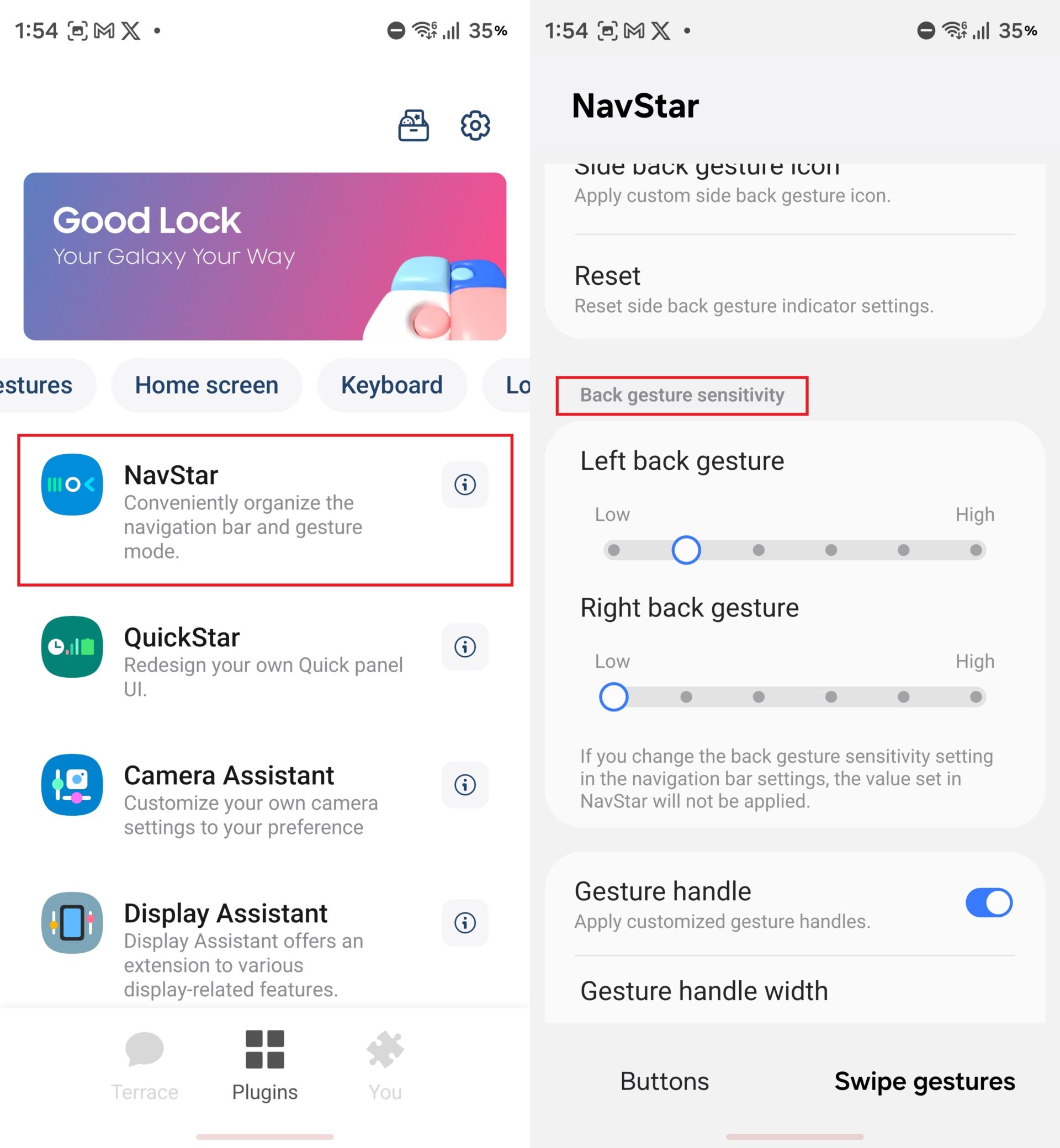
Then I remembered something else: Samsung's Good Lock app includes a plugin called NavStar that takes gesture customization a step further. Unlike the built-in navigation bar settings, NavStar lets you adjust the sensitivity of the left and right back gestures independently. It also lets you reduce the sensitivity even further than Samsung's standard settings.
That's exactly what I did. I set the right-side back gesture to the lowest sensitivity and left the left side untouched. I can still go back by swiping in from the right, but I have to start the swipe from almost the exact edge of the display.
Before, I had to be deliberate about where I started a swipe so I wouldn't go back. Now I only have to be deliberate when I actually want to go back. As a result, I no longer trigger the back gesture by accident.
I'm still fairly new to gesture navigation, and maybe I'll discover other annoyances in the future. But for now, this simple Good Lock tweak has solved my biggest complaint and convinced me to stick with gestures instead of returning to the three-button navigation bar.
If you've tried gesture navigation on your Galaxy phone before and couldn't get used to it, or you're already using gestures but find the back gesture annoying, I'd recommend giving this a shot.
Install Good Lock from the Galaxy Store or the Play Store if you haven't already, then open it and download NavStar from the Plugins tab. Open NavStar, turn it on using the toggle at the top, then scroll down to the Back gesture sensitivity section. Here, you can adjust the left and right back gesture sensitivity independently to suit your preferences.


Post a Comment